
Commercial Feature
AI Music Extender Tools: Extend Songs and Audio Like a Pro
A late‑night recording session ends with a perfect take, but the track is far too short for the playlist it was meant for. This is where AI music extender tools come in, quietly transforming clipped ideas into full‑length songs without noticeable seams. These tools analyze the existing audio’s melody, rhythm, and structure, then generate natural‑sounding extensions that match the original vibe.
Whether for DJ sets, social‑media clips, or longer intros, they allow creators to stretch audio like a pro while keeping the feel intact. This article walks through the leading AI audio extender platforms and shows how to use them effectively.
Part 1. How AI Music Extender Works Behind the Scenes
An AI music extender starts by analyzing your track’s melody, rhythm, and harmony. It uses trained neural networks to understand the musical structure. The tool then predicts how the song would naturally continue. It generates new bars that match the original style, tempo, and mood.
Behind the scenes, the audio is converted into compact numerical data. The AI audio extender model learns patterns from large music datasets. Finally, it creates seamless extensions that blend smoothly into your original clip.
Why AI Music Extender Tools Are Changing Audio Editing
So far, we’ve seen how AI music extenders work behind the scenes. Now let’s look at why they’re changing audio editing for good:
- Time‑Saving Automation: AI music extenders cut hours of manual looping and editing by stretching tracks in seconds, letting creators focus on the bigger picture instead of tedious details.
- Seamless Musical Flow: The tools preserve key, tempo, and vibe, so the extended sections feel like a natural continuation of the original song instead of forced or jarring additions.
- Democratizing Pro‑Level Editing: Even users without deep music theory or arrangement skills can produce polished, extended tracks, making advanced audio editing more accessible to beginners and hobbyists.
- Adapting to Any Audio Length: Content for social media, ads, games, and streams often needs specific durations; AI extenders let a single track fit multiple lengths without rebuilding it from scratch.

Part 2. Filmora: Best AI Music Extender Tools You Should Try
Wondershare Filmora has become one of the best AI audio extender tools by blending smart audio stretching with a full‑featured video editor. Creators can drop a short track onto the timeline and let Filmora’s AI analyze its rhythm, key, and mood. The tool predicts how the music should continue and adds new bars that match the original feel. This keeps the energy consistent from start to finish.
Moreover, it makes it easy to adapt a track to any video length, including intros, outros, and background music for social clips. With drag‑and‑drop use and real‑time preview, Filmora removes the technical hassle.
Key Features Offered By Filmora
- Speed Adjustment: This feature lets users speed up or slow down audio and video clips while maintaining smooth playback and synchronization.
- Audio Denoising: The AI Music Extender removes unwanted background noise, such as wind, hum, or static, to produce clearer, more focused audio.
- AI Voice Enhancer: Using intelligent processing, this tool automatically improves voice clarity and reduces distortions for more natural-sounding dialogue.
- Audio Normalizer: It balances volume levels across clips, so audio remains consistent throughout the video.
- Audio Ducking: This function automatically lowers the background music when dialogue or voiceover appears, keeping the main voice clear and audible.
Steps to Use Filmora AI Music Extender
After learning about the AI Extend and other audio features of this tool, let us learn how to use this AI audio extender for extending audio:
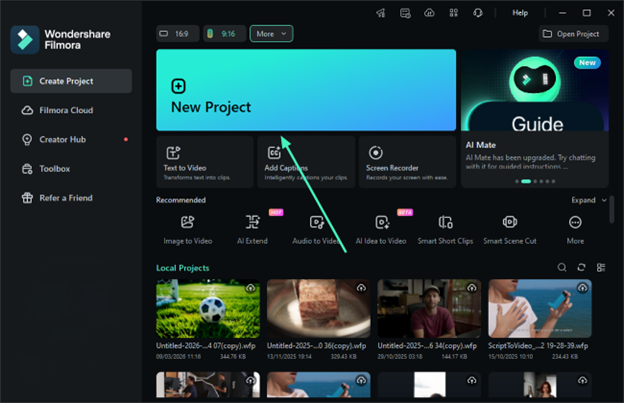
Step 1. Create New Filmora Project
To begin, launch Filmora on your device and click on “New Project.” Next, import the audio track that you want to expand and drag it to the editing timeline.
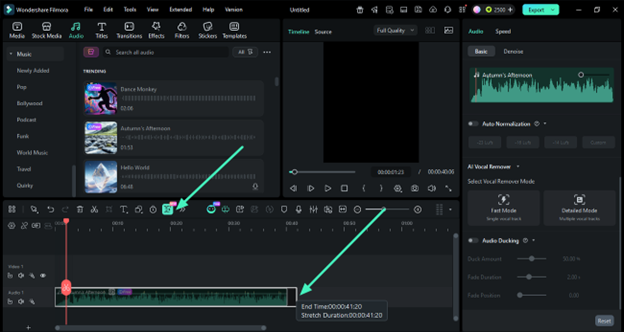
Step 2. Choose AI Extend Feature
Once the track is in the timeline, head to the toolbar above it and click the “AI Extend” icon. Now, hold down and drag the audio track forward to extend it with AI.
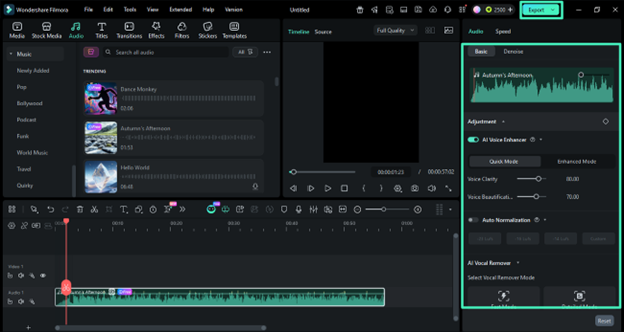
Step 3. Fine-Tune Audio and Export
Head to the panel on the right and refine the audio using different AI features such as “Audio Enhancement.” Once you are satisfied with the results, press the “Export” button to save it to your device.
Part 3. How to Get the Best Results from AI Audio Extender
Now that you know how AI music extenders work, the next step is learning how to get the best results from them in your projects.
- Use a Clean Final Mix: Feed the AI extender your most polished audio cut, with minimal noise and consistent levels, so the model can learn the track’s true character.
- Keep the Original Section Stable: Avoid abrupt cuts, sudden volume jumps, or missing elements in the part you want extended. A smooth starting segment gives the AI a clearer pattern to follow.
- Choose the Right Extension Length: Start with small additions (a few seconds) and preview, then gradually increase the extension instead of stretching the track too far at once.
- Match the Musical Section Type: Extend intros, outros, or repetitive sections rather than complex breakdowns, since simpler patterns are easier for the AI to continue naturally.
- Review and Trim at the Join: After generation, zoom in around the join between the original and the new audio, then cut or crossfade slightly if the transition feels tight.
Conclusion
To conclude, this article provided a detailed review of how to use the AI Music Extender offered by Filmora. By automatically extending background music to match video length, it removes the need for manual editing and repeated cuts. With its simple interface and smart AI processing, creators can produce seamless soundtracks in seconds. Overall, Filmora makes audio editing faster, smoother, and far more convenient for beginners and professionals alike.
 News / Cambridge City Council no longer controlled by Labour10 May 2026
 News / Judge Business School seeks deal with Saudi Defence Ministry 11 May 2026
 Comment / We have forgotten the value of hard work 11 May 2026
 Features / The analogue reTurn has come to Cambridge 10 May 2026
 News / Lucy students propose change to CamCard design9 May 2026
 Comment / The laundry revolution – Cambridge’s problem with technology13 May 2026
 Interviews / ‘I don’t think you can put a date on doomsday’: Luke Kemp on existential risk13 May 2026
 News / Former Caius professor under fire to quit as Freedom of Speech Director13 May 2026
 Theatre / Laugh, people! Laugh!13 May 2026
 News / News in Brief: council collaborations, celebrity celebrations, and Cambridge climate challenges12 May 2026
