
Commercial Feature
Unlock Professional Image Editing: Nano Banana and AI Image Upscaling Combined
Creating high-quality images for your content, products, or marketing campaigns has never been more accessible. Gone are the days when you had to spend hours adjusting every detail manually. Today, AI tools make the entire process faster, easier, and more intuitive.
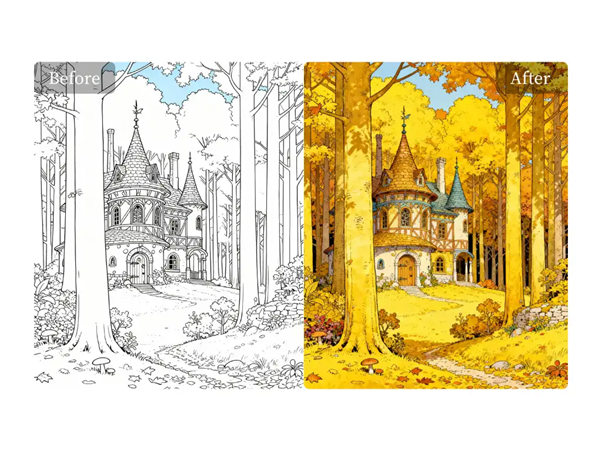
Two standout tools that are helping creators transform their images are Nano Banana Image Editing and AI Image Upscalers. These powerful AI tools not only allow you to edit images effortlessly but also enhance the quality of your visuals—making them sharper, more detailed, and print-ready. Let’s dive into how these tools work, how they compare to competitors, and why they should be part of your creative workflow.
Nano Banana Image Editing: Powerful Editing with AI Precision
One of the most innovative AI tools for image editing is Nano Banana Image Editing. Designed to offer high-quality and fast results, Nano Banana lets you transform your images in ways that traditional editing software can’t match. Whether you’re adjusting the image’s lighting, changing colors, or even altering the composition, Nano Banana’s AI helps you achieve precise edits with minimal effort.
For example, you can use Free Nano Banana Image Editing to:
- Change colors or alter specific features of an image
- Remove or replace objects without affecting the rest of the image
- Apply artistic styles to your images, from oil paintings to futuristic looks
- Enhance photo details while maintaining a natural look
With Nano Banana, you don’t have to be an expert in image editing. The tool simplifies complex tasks, allowing you to create professional visuals in a matter of minutes.
Competitor Comparison for Nano Banana Image Editing
| Tool | Strength | Common Limitation | Why Nano Banana stands out |
| Photoshop (AI features) | Versatile and powerful | Steep learning curve | Easy, quick edits with minimal setup |
| GIMP (with AI plugins) | Free, open-source | Can be complex for beginners | Fast, smart, and intuitive editing for non-experts |
| Fotor AI | Quick edits with minimal effort | Limited detailed control | More creative flexibility with AI-driven style choices |
| Luminar AI | Great for enhancing photos | Somewhat slow processing | Ultra-fast, responsive AI with superior precision |
What sets Nano Banana apart:
Unlike traditional software that requires time to master, Nano Banana Image Editing offers quick, professional-level editing without the steep learning curve. Whether you need to change a product’s color or alter the background, Nano Banana makes it simple with AI that understands your commands and executes them flawlessly.
AI Image Upscalers: Boosting Resolution Without Compromising Quality
After transforming your image with tools like Nano Banana, the next step is ensuring it looks sharp and crisp, even at larger sizes. AI image upscalers take care of this by increasing the resolution of your image while preserving (or even enhancing) the original details.
AI image upscalers work by analyzing the pixels of your image, filling in gaps intelligently, and maintaining a high level of detail. This is especially useful for creators who need to enlarge images for print or e-commerce platforms, where every pixel matters.
Free AI Image Upscaler Online is a tool that helps you upscale any image instantly, making it clear and high-resolution without the typical pixelation or blur that comes from traditional resizing methods.
Competitor Comparison for AI Image Upscalers
| Tool | Strength | Common Limitation | Why Ez-style tools stand out |
| Topaz Gigapixel AI | Best for highly detailed images | Paid version, requires installation | Fast, browser-based with no install required |
| Let’s Enhance | Simple interface and reliable results | Limited free use | Accessible for free with quality results |
| Upscayl | Open-source and free | Requires hardware for full functionality | Quick and simple, works for any device |
| Icons8 Smart Upscaler | Easy to use | Some over-sharpening | More natural-looking results with no distortion |
Why it’s perfect for creators:
AI upscalers like Free AI Image Upscaler Online ensure that your images look polished and ready for any platform, whether it’s an e-commerce site, social media, or print materials. It’s quick, hassle-free, and doesn’t compromise on quality.
The Power of Combining Nano Banana and AI Image Upscaling
Individually, both Nano Banana Image Editing and AI Image Upscalers offer powerful enhancements. But when combined, they unlock even more possibilities for creators. Here’s how they work together:
- Start with an image that needs a transformation or enhancement.
- Use Nano Banana Image Editing to make quick adjustments—change colors, add effects, or remove unwanted elements.
- Run the image through an AI image upscaler to increase the resolution, making the image sharp and professional.
- Export the final result, ready to be used for print, social media, or e-commerce platforms.
This combined workflow allows you to make high-quality edits and ensure that your images always look crisp and professional, regardless of where or how they’re displayed.
Final Thoughts: Streamlining Your Image Creation Process
AI tools like Nano Banana Image Editing and AI Image Upscalers are making professional image editing accessible to everyone. Whether you’re a designer, a small business owner, or a social media manager, these tools simplify the editing process and help you produce high-quality visuals in less time.
Gone are the days of spending hours perfecting an image. With these AI tools, you can focus on the creative aspects and let the AI handle the technical stuff. It’s time to elevate your content, increase your productivity, and keep up with the fast-paced world of digital creation.
 News / Missing Sidgwick sculpture spotted in Oxford 1 April 2026
 News / International students complain of ‘impossible choice’ under Cambridge travel disruption policy28 March 2026
 News / Downing law society banned from holding formals in College for a year31 March 2026
 News / Belgian university faces backlash over appointment of ‘race-realist’ fellow31 March 2026
 Comment / The anti-AI performance at Cambridge 30 March 2026
 Interviews / Cambridge SU presidents on divestment, engagement and the role’s challenges1 April 2026
 Features / Hyper-productive or healthy? The rise of wellness culture at Cambridge1 April 2026
 Film & TV / Awards season goes to the dogs1 April 2026
 News / Homerton plans to convert former Labour Club into student accom1 April 2026
 Theatre / Inside the double life of a thespian student 1 April 2026
