
Commercial Feature
How to Create an Attractive Freelancer Portfolio [5 Tips & Examples]
Clients don’t read portfolios. They scan them. They glance at the layout, skim a headline or two, maybe click one project thumbnail—and within fifteen seconds they’ve already decided whether to reach out or close the tab. That’s the game.
So building an attractive freelancer portfolio isn’t about cramming in every project you’ve ever touched. It’s about engineering a first impression that earns a second look. This guide covers five tips that target exactly that—plus a detailed breakdown of a real freelance portfolio website from designer Alaa Hajji, so you can see how these principles look in practice.
What Is a Freelancer Portfolio?
A freelancer portfolio is a curated collection of your strongest work, built to do one thing: convince a stranger to hire you. Not to document your career history. Not to impress other freelancers. Just to move a potential client from “who is this?” to “I want to work with them.”
What that looks like depends on the craft. A freelance graphic designer portfolio leads with visuals—brand systems, packaging, campaign assets. A freelance web designer portfolio highlights interactive sites and responsive layouts. A content writer portfolio focuses on published pieces, editorial strategy, and measurable outcomes. But the underlying architecture of a freelancer website portfolio stays consistent across disciplines: a homepage that positions you, curated work samples with context, a short about section, and a contact form that takes thirty seconds to fill out.
The mistake most freelancers make? Treating the portfolio like a gallery. It’s not. It’s a sales page with samples attached. Every element should push a visitor toward one action: getting in touch.
5 Tips to Create a Stand-Out Freelancer Portfolio
Strong work is the baseline. What turns a collection of good projects into a client-generating machine is how you present, organize, and frame that work. These five tips focus on the structural and strategic choices that actually move conversion rates.
1. Lead With Positioning, Not Your Name
Open most freelance portfolio websites and you’ll see the freelancer’s name in oversized type. It’s a wasted opportunity. A first-time visitor doesn’t care about your name yet. They care about whether you can solve their problem.
Replace the hero section’s name banner with a clear positioning statement. Something like “Brand identity design for startups that want to look like they’ve been around for a decade” communicates more in one line than a name, a title, and a paragraph of biography combined. Your name can live in the navigation. The headline spot belongs to your value proposition. This applies equally whether you’re building a freelance graphic designer portfolio or a portfolio for content writer work.
2. Frame Every Project as a Problem-Solution Story
Thumbnails and titles are the bare minimum. To make a freelancer portfolio genuinely persuasive, each sample needs a brief narrative arc: what challenge the client faced, what approach you took, and what the outcome was.
This doesn’t require a full case study page. Three to five sentences below the project image can do it. “The client needed a brand refresh ahead of a Series A fundraise. I redesigned the logo, color system, and pitch deck. They closed their round at $4M.” That story is more convincing than a dozen unsupported screenshots. Even a freelance writer portfolio benefits from this—“This article ranked #1 for its target keyword within six weeks” turns a sample into proof.
3. Use YouWare Vibe Coding Platform
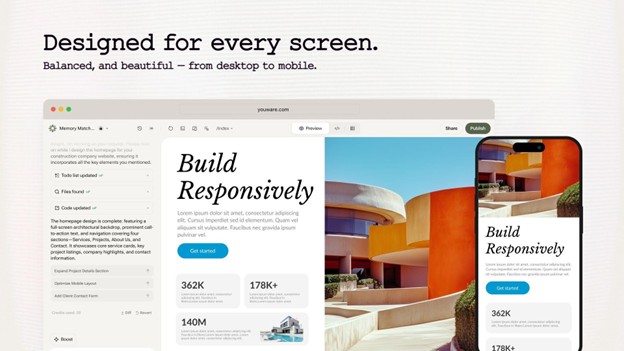
Between Figma files, client feedback, and actual project work, most freelancers don’t have the bandwidth to fight with website builders. That’s the gap YouWare fills. It’s a vibe coding platform: describe your ideal freelancer website portfolio in plain English—pages, layout, color direction, what each section should do—and the AI generates a polished, functional site. No templates. No code. Just a conversation that ends with a live freelance portfolio website.
I tested it by describing a designer portfolio: dark background, grid-based project gallery, a short about section, and a contact form connected to a database. The whole thing was live in about twenty minutes. But what surprised me wasn’t the front end—it was the backend tools that came packaged with it.
Key Features:
• YouBase – A built-in backend that stores every form submission, manages leads, and can process payments. No need to wire together separate tools for forms, CRM, and invoicing. For freelancers managing multiple prospects, YouBase turns a static portfolio into an actual business system.
• Coview – Share a live coview link with a client or collaborator so they can browse your portfolio and leave comments directly on the page. It’s perfect for getting feedback on a new case study before publishing, or for walking a prospect through your work asynchronously.
• Auth & Gating – Lock premium case studies behind a booking step or login. Visitors who care enough to sign up are already warmer leads. It filters out casual browsers and creates a sense of exclusivity around your best work.
• AI-Driven Updates – Finished a new project? Describe it in a sentence and YouWare rebuilds that section of your site. Keeping your freelance portfolio website current takes minutes, not hours.
• Custom Domain – Connect your own domain for a fully branded experience.
How to Build Your Portfolio With YouWare:
1. Sign up at YouWare and create a new project.
2. Describe your portfolio’s structure and aesthetic in natural language. Mention the number of pages, layout preferences, and any specific functionality you need.
3. Upload project images and work samples. YouWare generates structured cards with image placements and description fields.
4. Activate YouBase to capture contact form submissions and manage your inquiry pipeline.
5. Share a coview link for pre-launch feedback, then connect your domain and go live.
4. Design for the Three-Second Scan
Clients don’t read top to bottom. They scan in an F-pattern: headline, subheading, first visual, CTA. If those four elements don’t communicate your value, the rest of your page barely matters.
Keep paragraphs short. Use white space generously. Place your strongest project at the top of the work section, not buried in the middle. And make the primary CTA—“Book a Call” or “Get a Quote”—visible without scrolling. This applies to a freelance web designer portfolio as much as it does to a content writer portfolio. The principle is universal: respect the scan.
5. Test on Mobile Before You Share Anywhere
More than half of web traffic comes from mobile devices. If your freelancer portfolio breaks on a phone—tiny text, overlapping elements, a contact form that’s impossible to fill out—you’re invisible to the majority of your visitors.
Before sharing your freelance portfolio website with anyone, open it on your phone. Tap every link. Fill out the contact form. Scroll through every page. If anything feels off, fix it first. YouWare generates responsive layouts by default, which sidesteps the most common freelancer website examples pitfall: a site that looks great on desktop and falls apart everywhere else.
Freelance Portfolio Example: Alaa Hajji
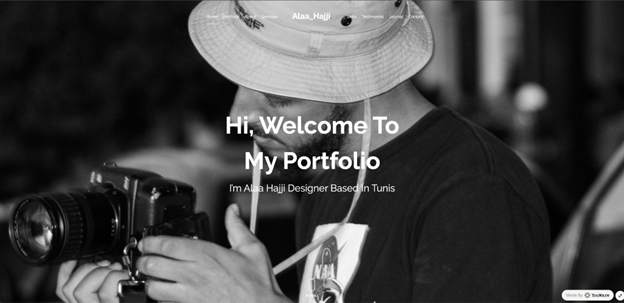
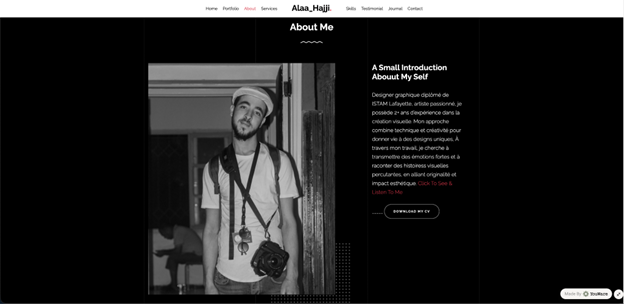
Reading tips is one thing. Seeing them executed is another. Alaa Hajji is a designer whose freelance portfolio website demonstrates several of the principles above—and does it with a distinctive visual identity that sticks in your memory.
Positioning front and center. Alaa’s homepage doesn’t open with a generic greeting or a name in giant type. The design itself communicates the niche: this is someone who works at the intersection of visual identity and digital product design. Within seconds, a visitor knows what Alaa does and the caliber of work to expect.
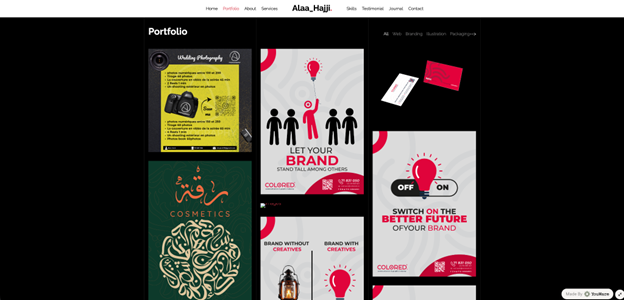
Project presentation with context. Each portfolio piece isn’t just a thumbnail. Alaa provides enough narrative to understand the scope—brand direction, design challenges, final deliverables. It turns a gallery into a series of mini case studies, which is exactly what separates a forgettable freelance graphic designer portfolio from one that lands inquiries.
Clean visual hierarchy. The layout is deliberate. White space guides the eye. Typography is confident without being loud. Navigation is minimal. Nothing competes for attention—each section flows into the next. It’s a masterclass in letting the work breathe.
Friction-free contact. The contact section is easy to find and easy to use. No hunting through sub-menus, no email-only contact method. A simple form gets visitors from “interested” to “inquiry sent” in under a minute.
Key Takeaways From Alaa’s Portfolio:
• Let the design quality of the portfolio itself prove your skill—don’t rely on words to explain what the visuals should show.
• Context around each project matters. Even brief descriptions transform passive browsing into active evaluation.
• Minimalism isn’t about having less—it’s about removing everything that doesn’t serve the goal of getting hired.
• Mobile responsiveness isn’t optional. Alaa’s portfolio works seamlessly across screen sizes.
Whether you’re building a freelance graphic designer portfolio, a freelance web designer portfolio, or a content writer portfolio, the structural lessons from Alaa’s site apply: position yourself clearly, show context behind every piece, keep the layout clean, and make it dead simple to get in touch.
FAQs on Freelancer Portfolio
1. Which Website Is Best for Making Freelance Portfolios?
YouWare is the strongest option for freelancers who want a professional freelancer portfolio without coding or fighting templates. Describe your site in plain language and the AI builds it—complete with YouBase for lead management and coview for collaborative previewing. WordPress offers deeper customization but takes significantly more setup time. Squarespace provides polished templates with less flexibility on the backend.
2. How to Start a Freelancing Portfolio?
Select five to eight projects that represent the work you want to attract. Write a short story for each: problem, approach, result. Pick a platform—YouWare for speed, WordPress for full control—and build four core pages: home, work, about, and contact. Don’t wait for perfection. A live freelancer website portfolio you can iterate on is infinitely more valuable than an unfinished draft sitting on your laptop.
3. How to Make a Portfolio for a Freelancer?
Start with one clear niche reflected in your homepage headline. Curate samples ruthlessly—only keep projects that would make a client say “I need this.” Add brief outcome-driven context to each piece. Write a first-person about page that sounds like a human, not a LinkedIn profile. Keep the contact form to four fields, connect it to YouBase so submissions are tracked, and test everything on mobile. Then put your freelance portfolio website link everywhere: proposals, social profiles, email signature, cold outreach.
 Comment / Drinking or drowning? The hidden culture behind C-Sunday1 May 2026
 Features / ‘It was genocide, not a civil war’ – Cambridge University Tamil Society remembers the Sri Lankan Civil War2 May 2026
 News / Cambridge Nightline to reopen its phone service3 May 2026
 News / Two more women allege sexual harassment by classics professor Simon Goldhill 28 April 2026
 News / Protesters call for regime change in Iran2 May 2026
 News / Joe Hesketh wins hotly contested Union presidency by-election4 May 2026
 Lifestyle / You probably haven’t tried this before…4 May 2026
 Comment / The puffer: power and belonging4 May 2026
- News / Cambridge Nightline to reopen its phone service3 May 2026
 Lifestyle / Room for work3 May 2026
