
Commercial Feature
Using an Image to Image AI Generator to Turn One Visual into Marketing Variations
There is a moment in most marketing workflows when the visual team delivers the hero image for a campaign and everyone agrees it is good. It cleared the brief, it looks right, it is approved. And then the requests begin: the social team needs a square crop with a different background for Instagram, the email team needs a cleaner version with more headroom for a subject line overlay, the paid ads team needs three test variants with different color temperatures, and someone in brand is asking about an alternate for a different audience segment.
The approved image, far from being finished, is now the starting point for ten more deliverables. And because those deliverables are treated as separate projects rather than extensions of the same asset, each one kicks off its own production cycle.
Why One Approved Image Should Do More Work
The concept of a visual asset as a single file is one of the most persistent inefficiencies in marketing production. An approved image represents not just a visual, but a set of decisions that were reached after rounds of feedback, alignment, and revision. The composition was chosen. The color direction was settled. The product is in the right spot. The mood is correct.
All of that accumulated decision-making is sitting in a single file. Using it once, for one placement, and then treating every subsequent need as a separate creative project wastes the investment that went into the approval process.
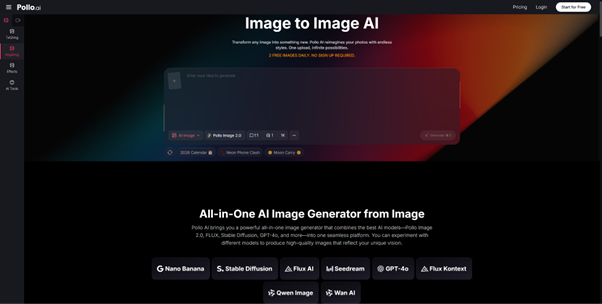
Pollo AI changes this math by treating the approved image as a generative asset rather than a static deliverable. The image to image AI generator from Pollo AI lets you upload the image, describe the variation you need in plain language, and the model produces a version that preserves the structural decisions already made — the subject, the composition, the core identity — while applying the change you specified.
The workflow is three steps: upload the source image, select a LoRA if a specific style target is needed, enter the prompt describing the desired variation, and click Create. With access to more than 2,000 LoRAs and multiple models including Pollo Image 2.0, FLUX, Stable Diffusion, and GPT-4o, the variation space is wide enough to cover most campaign needs from a single starting point.
How to Generate Background, Style, and Audience Variants
The categories of variation most useful for marketing teams fall into a predictable set:
Background variants — The same product or subject in front of different environments: white studio, dark moody setting, outdoor natural context, abstract color field. These are often needed for A/B testing or for adapting a visual to different platform aesthetics.
Color temperature variants — Warmer or cooler treatment of the same image. Seasonal campaigns, audience targeting, and platform conventions all create demand for color variation that preserves the underlying composition.
Lifestyle context variants — Shifting the scene from a clean product shot to a usage-in-context shot, or from a formal setting to a casual one, without rebuilding the image from scratch.
Tonal variants — The aspirational, premium version of an image for brand-building contexts versus a more direct, high-contrast version for promotional pushes. These often perform differently across audiences and channels, which is why having both matters.
Audience segment variants — Minor differences in environmental context or styling that shift the implicit audience signal without changing the core product or subject. A subtle adjustment in background texture, lighting, or surrounding objects can make the same product feel more relevant to different demographic contexts.
The prompt for each variant is typically short and targeted: describe what changes, and be explicit that the subject and composition stay the same. The more precisely you define the delta — the difference between the source and the target — the more efficiently the model lands where you need it.
Keeping the Core Subject Intact Across Multiple Versions
The practical risk of generating multiple variants from a single source is subject drift — the product looks slightly different in each version, or the composition subtly shifts, or a detail changes in a way that makes the variants feel inconsistent with each other.
Managing this requires attention at the prompt level. State explicitly what should not change. Anchor the subject description in your prompt even when the change you are requesting is entirely about the environment: “same product in center, same perspective, same proportions — background only should change to a dark textured surface.”
Using a consistent LoRA across the variant set also helps. If you established a visual look for the campaign using a specific LoRA, applying that same LoRA to each variant creates a shared aesthetic baseline that makes the variants feel related rather than random.
Adapting Visuals for Different Campaign Placements
Different placements have different visual requirements that go beyond just aspect ratio. A social card optimized for a feed needs to communicate fast — high contrast, clear focal point, limited information. An email header needs breathing room — a lower-information composition that works with a text overlay. A paid display ad needs clarity at small sizes — simple shapes, strong color differentiation.
Each of these is a variation on your approved hero, not a separate creative brief. Treating them as such — and using image-to-image generation to produce them from the same source — is where significant time savings come from.
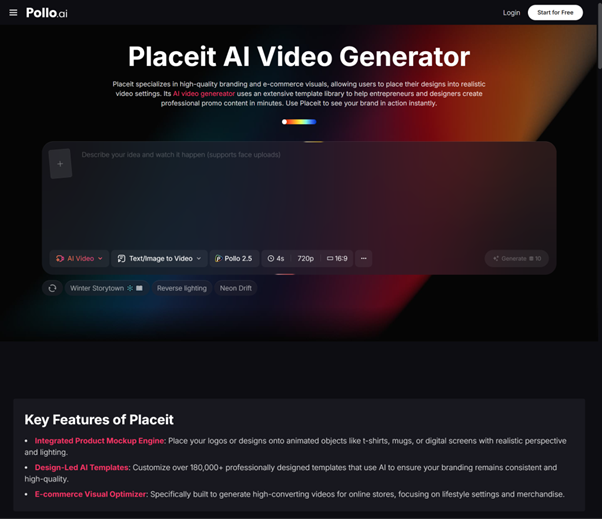
For visual adaptations that go beyond still images — packaging visuals into format-specific templates or presentations — Placeit is a Pollo AI reference page worth exploring for that type of adjacent workflow alongside your Pollo AI image generation toolkit.
The production math becomes much more favorable once you stop treating every placement as a blank-canvas project. If a campaign requires twelve placements across five channels, and each placement previously required a separate design request, the design queue fills up before the campaign can launch. If each placement is instead a variation on one approved asset, the queue shrinks to one: get the hero right, then generate the variants.
How to Reduce Dependence on External Design Resources
The deeper value of this workflow for marketing teams is not just speed — it is the shift in who can produce what. When generating a variant requires uploading an image and writing a sentence, the range of people who can reasonably execute that task expands considerably. The social media manager who needs a square crop does not have to wait in the design queue. The growth team that wants three ad variants for an A/B test does not need to brief a designer for each one.
This does not replace design thinking. The approved hero still required a designer’s judgment to create. But the expansion of that asset into a campaign variant set — which is mostly an execution task, not a creative one — can happen without a designer’s involvement for each iteration.
The result is a more agile production process, a shorter path from approved concept to live campaign, and a design function that can focus on the decisions that genuinely require design expertise rather than spending capacity on repeatable variation tasks.
 Interviews / ‘You have to take it as it comes’: discussing content creation with Auden Barnes17 May 2026
 News / Science Park to ‘triple’ in size with £3bn investment21 May 2026
 News / Sons of imprisoned Saudi scholars urge Cambridge to call off deal with Saudi defence ministry22 May 2026
 Science / Forked over: dish-parity between college cafeterias17 May 2026
 Theatre / Crossing Points devastates the Corpus Playroom20 May 2026
 News / King’s fellow excluded over sexual harassment allegations23 May 2026
 Arts / The modern, Cambridge ‘Paragone’23 May 2026
 Sport / Fitzwilliam narrowly regain Cuppers trophy in tight affair with Selwyn22 May 2026
 Comment / The personal cost of reporting sexual violence at Cambridge22 May 2026
- News / Sons of imprisoned Saudi scholars urge Cambridge to call off deal with Saudi defence ministry22 May 2026
