
Commercial Feature
Transform Your 3D Workflow: How Tripo Studio’s AI Automates Modeling, Texturing and Retopology
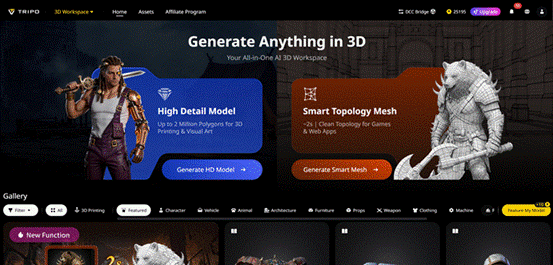
For 3D creators—whether you’re a hobbyist in Omaha, a game developer in Lincoln, or a product designer across Nebraska—every project comes with the same frustrating roadblocks: endless hours spent on manual retopology that saps creativity, repetitive UV mapping that feels like a chore, and painstaking texture work that delays progress. Even seasoned artists find themselves stuck in fragmented workflows, jumping between multiple tools just to turn a simple idea into a polished 3D asset. The gap between inspiration and execution is often wide, filled with technical hurdles that make 3D creation feel inaccessible to all but the most skilled professionals. But AI is changing that narrative—automating the most tedious, time-consuming tasks so creators can focus on what matters: bringing their ideas to life. Tripo Studio, the world’s first all-in-one AI 3D model generator, is leading this revolution, turning complex 3D workflows into a seamless, intuitive process that’s fast, accessible, and built for real-world use—whether you’re a beginner or a pro.
Core Capabilities of Tripo Studio
1. Text to 3D Model
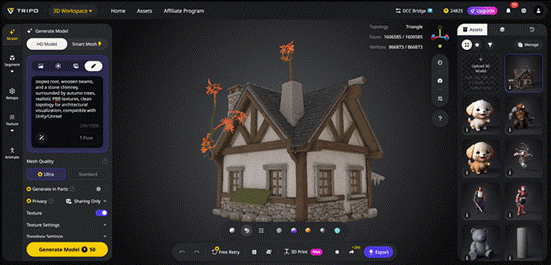
Tripo Studio’s Text to 3D Model feature converts written descriptions into detailed, production-ready 3D models with a single input. It solves the challenge of translating abstract ideas—from a “vintage wooden chair with curved legs” to a “futuristic spaceship console”—into tangible 3D geometry without any manual modeling. Powered by a 20-billion+ parameter algorithm, it parses key details like materials, shapes, and relationships to deliver accurate results, with prompt suggestions to guide new users and two modes (Standard and Ultra) for balanced speed or maximum detail.
2. Image to 3D Model
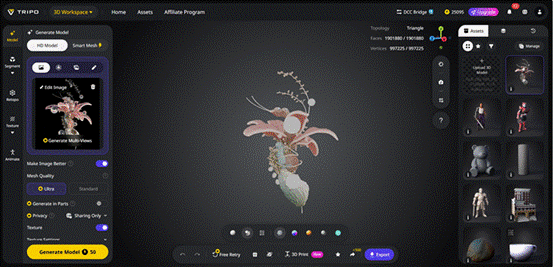
This powerful image to 3D model function can convert individual images, hand-drawn sketches, or multi-view reference photos into complete and detailed 3D assets directly, without relying on manual tracing or speculative modeling. It effectively solves the common difficulty of converting clear visual references—such as hand-drawn design drafts or photographs of real-world objects—into digital 3D models. Equipped with built-in image optimization utilities, it improves sharpness and corrects small flaws in source materials. Before generating 3D models, users can further polish their creative concepts using integrated tools including Nano Banana and ChatGPT-4, establishing a seamless workflow from initial inspiration to finished 3D output.
3. AI Model Segmentation:
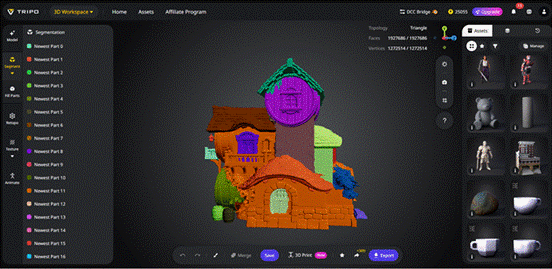
Tripo’s AI Model Segmentation automatically divides complex 3D models into logical and editable components. Typical examples include a character’s arms, a chair’s seat, and various environmental props. This feature resolves the challenge of editing large and cumbersome meshes as a single unit. It enables creators to focus on specific parts for texturing, exporting, or reuse, which is essential for workflows such as 3D printing and game development. It also provides part completion functionality to fix fragmented surfaces, turning segmented components into watertight meshes that are ready for production.
4. AI Retopology
This feature automates the tedious, time-consuming task of manual retopology, giving creators fine-grained control over mesh quality. It solves the issue of messy, unoptimized meshes that are hard to edit or export, allowing users to choose between triangle meshes (for game engine compatibility) or quad meshes (for smoother deformation in tools like Blender). With automatic or manual polygon count adjustment and a Smart Low Poly option, it ensures models integrate seamlessly into professional pipelines without extensive cleanup.
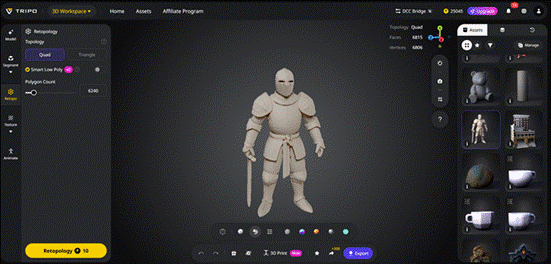
5. AI Texturing
Tripo’s AI Texturing creates PBR-ready textures from text prompts or reference images, eliminating the hours of manual texture painting that plagues 3D creators. It solves the problem of inconsistent, low-quality textures, supporting custom uploads, one-click global texturing, and localized edits with the Magic Brush. A creativity slider balances accuracy and artistic freedom, while optional 4K output ensures textures meet modern production standards and export seamlessly to Unity, Unreal, and other platforms.
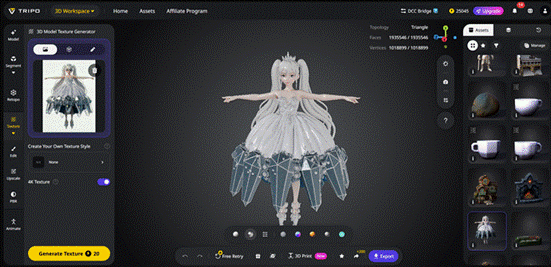
6. Auto Rigging
This feature turns static 3D models into animation-ready assets with a single click, solving the complex, time-consuming task of manual rigging. It generates clean skeletons and smooth skin weights, with two rigging models (V2.5 for animals, V1.0 for humanoids) to suit different projects. A built-in library of 100+ mocap-quality animations and a Lock Frame function for 3D printing (freezing poses for static export) add even more versatility.
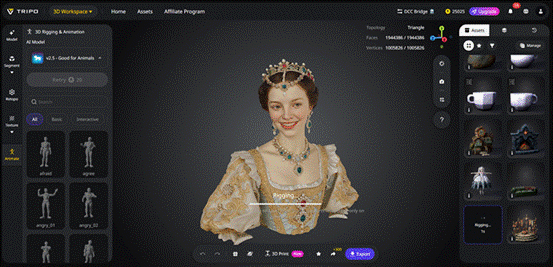
Real-World Use Cases for Tripo Studio
Tripo Studio isn’t just a tool—it’s a solution for creators across industries, adapting to diverse needs and making 3D creation accessible to all:
• Game Development: Game devs can quickly generate props, characters, and environmental assets, from low-poly game-ready models to high-detail textures, cutting production time dramatically. Tripo’s seamless integration with Unity and Unreal makes it a go-to for indie studios and large teams alike, streamlining workflows and reducing time spent on technical tasks. Just like how AI tools have revolutionized other creative fields, Tripo is making game asset creation faster and more efficient than ever before.
• Archviz (Architectural Visualization): Architects and designers in Nebraska can turn 2D floor plans or sketches into 3D models to showcase spaces to clients, letting them visualize projects before construction. Auto-texturing and retopology ensure realistic, professional renders without the usual technical hassle, bridging the gap between design and client understanding.
• 3D Printing: Hobbyists and creators can turn ideas into physical objects—from custom keychains to figurines—with Tripo’s watertight mesh generation, Lock Frame function, and direct export to STL format. Free re-rolls let users perfect their models before printing, making 3D printing accessible to anyone, regardless of skill level.
• Product Design: Local product designers can prototype quickly, testing different shapes, textures, and details without manual modeling. Tripo’s high-quality outputs help refine concepts early in the design process, saving time and resources—critical for small businesses and startups looking to iterate fast.
• VFX / Metaverse: VFX artists can generate assets for films, videos, and virtual worlds, while metaverse creators can build immersive environments and avatars—all within a single workspace. Tripo’s ability to handle both text and image inputs makes it perfect for rapid iteration in fast-paced VFX and metaverse projects, similar to how new technologies are breaking down barriers in digital content creation.
What Makes Tripo Studio Stand Out?
Tripo Studio differentiates itself with user-centric features that prioritize ease of use and professional quality—without the hard sell. Its key advantages include:
• Speed: Generate 3D models in seconds, not hours, with automated workflows that eliminate manual tedious tasks. Even complex models take less than a minute to generate, with free re-rolls for unsatisfactory results—cutting down project timelines by up to 90% for many creators.
• Quality: Production-ready outputs with clean geometry, high-detail textures, and customizable topology—rivaling models created by professional artists. Tripo’s advanced algorithm ensures detail fidelity that’s comparable to manual modeling, making it suitable for commercial and production use cases.
• No Professional Skills Required: An intuitive browser-based interface that requires no prior 3D experience, making it accessible to hobbyists, students, and small business owners—while still being powerful enough for industry professionals. This accessibility is key to democratizing 3D creation, much like how user-friendly technologies have opened up other creative fields to broader audiences.
• All-in-One Workspace: No more jumping between modeling, texturing, and rigging tools—everything you need is in one unified platform, from initial generation to final export. This seamless workflow eliminates the friction of switching between software, saving time and reducing frustration.
Step-by-Step Guide: Create a 3D Asset in 5 Minutes with Tripo Studio
Tripo Studio’s simplicity makes it easy to create professional 3D assets in just five steps—perfect for beginners and pros alike:
1. Upload Image / Type Prompt: Start by either typing a detailed text description (e.g., “a modern ceramic vase with a matte white finish and curved neck”) or uploading a photo, sketch, or reference image. Use the built-in prompt suggestions if you need help refining your idea.
2. Generate 3D: Click “Generate” and let Tripo’s AI work its magic. In seconds, your input will be transformed into a clean 3D model. Choose Standard mode for a balance of speed and quality, or Ultra mode for maximum detail.
3. Auto-Segment + Retopologize: Use AI Model Segmentation to split the model into editable parts (if needed), then apply AI Retopology to optimize the mesh—adjust polygon count or choose between triangle/quad meshes with a few clicks.
4. AI Texture: Add textures using a text prompt (e.g., “matte white ceramic with subtle gray accents”) or upload a reference image. Use the Magic Brush for localized edits and upscale to 4K if needed for professional quality.
5. Export: Choose your preferred format (STL for 3D printing, OBJ/FBX for game engines, GLB for web) and export your asset. You can also use the DCC Bridge to transfer directly to Blender with materials intact.
Ready to Simplify Your 3D Workflow?
The era of exhausting manual 3D modeling, disjointed production pipelines, and creative fatigue is finally over. Tripo Studio integrates advanced AI technology into the 3D creation process, delivering greater speed, simplicity, and accessibility for users of all kinds. Hobbyists designing 3D‑printed keepsakes, game developers working to tight deadlines, and designers building product prototypes can all benefit from its intuitive capabilities.
 Comment / Top of the slops: the competitiveness of college dining4 June 2026
 Interviews / What’s the story behind Pages coffee house?8 June 2026
 News / News in Brief: Cambridge crowns, council confirmations, and competitive cricket8 June 2026
 Comment / The Cambridge drift1 June 2026
 News / Cambridge researchers produce ‘world-first’ AI vaccine6 June 2026
 Arts / Don’t rush me – I’m reading!9 June 2026
 Lifestyle / Don’t Cry at Me, Argentina – a next-year abroad story8 June 2026
- News / News in Brief: Cambridge crowns, council confirmations, and competitive cricket8 June 2026
 Science / Failure is the foundation of science8 June 2026
 Fashion / The hidden gems of formal fashion8 June 2026
